Phone Screen Flickering? Here Is What Is Actually Wrong
A screen that shimmers, pulses, or stutters is not always a dying phone. Sometimes it is a setting. Sometimes it is one badly behaved app.
But sometimes phone screen flickering is the first warning that a display panel is failing. This guide shows you how to tell the difference in five minutes, before you spend anything.
The Short Version
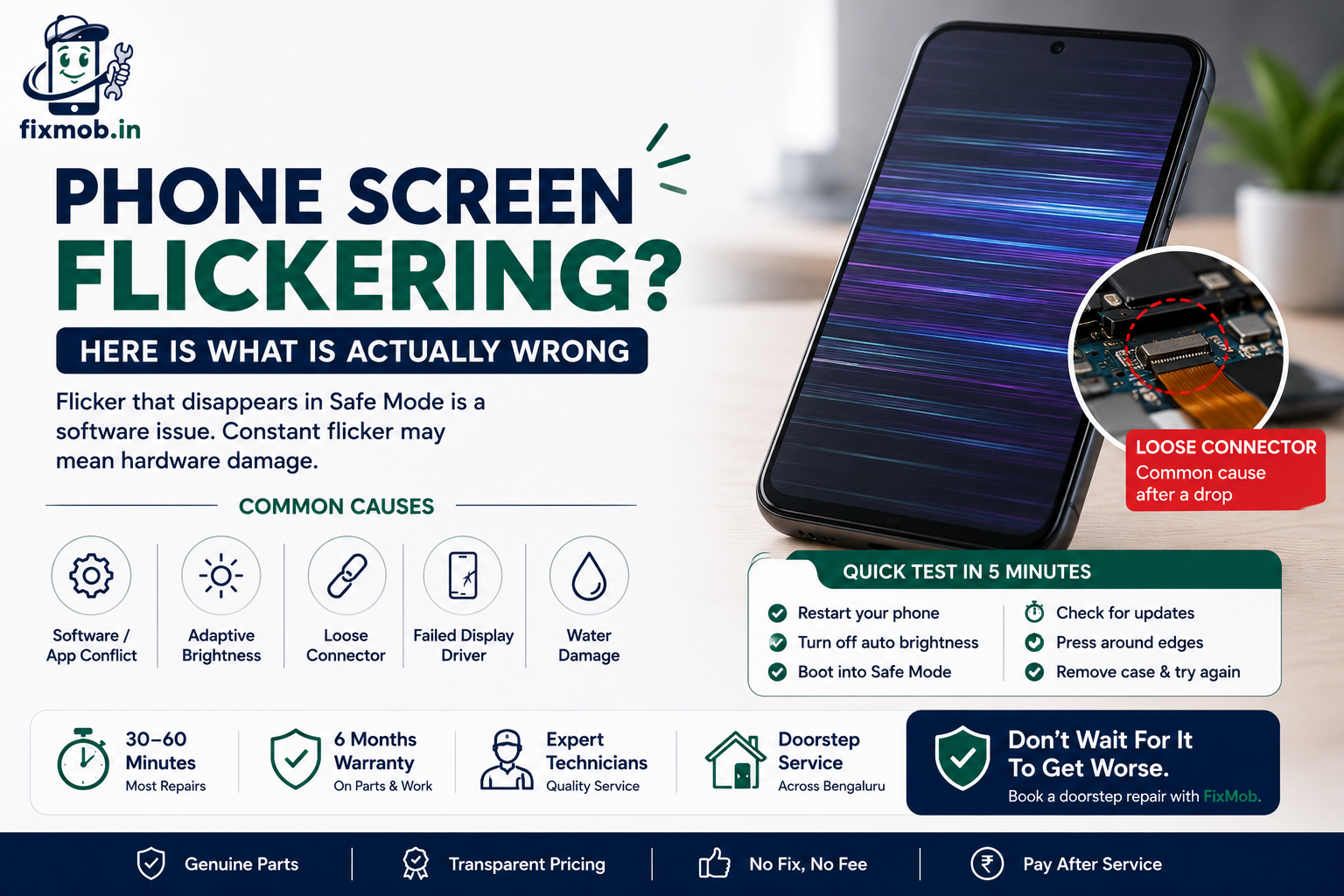
• Flicker that disappears in Safe Mode is a software conflict, not a broken display
• Shimmer at very low brightness on an OLED phone is normal PWM dimming
• Flicker that started after a drop usually means a loose display connector
• A flicker paired with a coloured line points to a failed display driver
• Panel replacement in Bangalore ranges from about 1,500 to 15,000 rupees by model
What Causes Phone Screen Flickering?
Phone screen flickering has four common causes: a software or app conflict, an adaptive brightness setting fighting the ambient light sensor, a loose display connector after a drop, and a failing display driver chip. Only the last two need hardware repair.
The order matters because the cheap causes are far more common than the expensive ones. Most people who arrive convinced their panel is dead leave with a settings change instead.
One detail narrows it down quickly. Software faults come and go with what is on the screen, while a hardware fault behaves the same on a blank white page as it does inside a game.
Here is what each cause looks like in daily use:
• App conflict: the flicker appears only in one app, often a camera, video, or game
• Adaptive brightness: the screen pulses when you move between a bright room and a dark one
• Loose connector: the flicker changes when you press or twist the phone gently
• Display driver failure: the flicker is constant, ignores brightness, and often brings a line with it
• Overheating: the flicker appears only when the phone is hot, then settles as it cools
If the screen is also registering taps you never made, that is a different fault. Our guide to ghost touch on a phone screen covers that one separately.
Is It A Software Glitch Or A Hardware Fault?
You can separate the two without any tools. Software faults respond to Safe Mode, a restart, or a settings change. Hardware faults do not. If phone screen flickering survives Safe Mode and a reboot, the problem sits in the panel or the board.
Use this table to place your symptom before you pay for anything.
|
What you notice |
Most likely cause |
Type |
Typical fix |
|
Flicker stops in Safe Mode |
A recently installed app |
Software |
Uninstall the app |
|
Flicker only at low brightness |
PWM dimming on an OLED panel |
Normal behaviour |
Raise brightness or turn on DC dimming |
|
Flicker only in one app |
App rendering bug |
Software |
Update or reinstall that app |
|
Flicker changes when you press the screen |
Loose display connector |
Hardware |
Reseat the connector |
|
Constant flicker with a coloured line |
Failed display driver |
Hardware |
Replace the panel |
|
Flicker only when the phone is hot |
Thermal stress on the panel |
Hardware |
Diagnose, often panel or board |
The pressure test in row four is the most useful one on the list. A fault that reacts to gentle pressure is almost always mechanical, which usually means a cheaper fix than a full panel.
How Do You Test Your Screen In Five Minutes?
Work through these six checks in order before booking anything. Each one rules out a cause, so by the end you know whether phone screen flickering is a software problem you can solve tonight or a hardware fault that needs a technician.
1. Restart the phone. Hold power, then restart. A surprising share of flicker is a stuck rendering process.
2. Turn off adaptive or auto brightness. Set brightness manually to about 60 percent and watch for two minutes.
3. Boot into Safe Mode. On most Android phones, hold the power button, then press and hold Power Off until the Safe Mode prompt appears. If the flicker stops, an app is responsible.
4. Check for a system update. Open Settings, then System, then Software update.
5. Remove the case and screen protector. A thick protector can trap heat and press on the panel edge.
6. Press gently around the screen edges. If the flicker changes or worsens, the display connector is loose.
One extra clue is worth chasing. If the flicker only shows up once the phone is warm, the panel may be reacting to heat rather than failing outright, and our guide to phone overheating causes and fixes covers what to do about that.
If checks one to five change nothing and check six makes it worse, stop testing. Repeated flexing on a loose connector can tear the ribbon cable and turn a small repair into a full replacement.
When Does Flickering Mean The Display Must Be Replaced?
Replace the panel when the flicker is constant, ignores every software fix, and comes with a line, a tint, or a dead area. At that point phone screen flickering is a symptom of a failed panel, not a setting, and no amount of resetting will bring it back.
Manufacturers acknowledge this pattern themselves. Google’s Pixel Phone Help lists a flickering screen, a green tint, and horizontal or vertical lines together as signs of a possible hardware issue, and points owners toward repair rather than further troubleshooting.
Four signs the panel is finished:
• The flicker never stops, at any brightness, in any app
• A vertical or horizontal line has appeared alongside it
• Part of the screen has gone dark, milky, or discoloured
• Touch has become unreliable in the flickering area
A cracked panel that also flickers is a clear case. If yours is in that state, cracked screen repair explains why waiting makes it worse.
What Does A Display Replacement Cost In Bangalore?
Expect roughly 1,500 to 3,500 rupees for a compatible LCD on a budget Android phone, 4,000 to 9,000 rupees for a mid-range AMOLED, and 9,000 to 15,000 rupees or more for a flagship or recent iPhone panel. Always confirm with a quote for your exact model.
|
Phone type |
Panel used |
Indicative range |
Notes |
|
Budget Android, LCD |
Compatible LCD |
1,500 to 3,500 rupees |
Colour and brightness slightly below original |
|
Mid range, AMOLED |
OEM equivalent AMOLED |
4,000 to 9,000 rupees |
Good match on most models |
|
Flagship Android |
Original or OEM AMOLED |
9,000 to 15,000 rupees |
In display fingerprint needs care |
|
Recent iPhone |
Original or OEM OLED |
9,000 rupees and upward |
True Tone needs programming |
These are market ranges across Bangalore, not a fixed price list, and the gap between the numbers is almost entirely about which panel goes in. Our comparison of original and compatible mobile screens explains what you give up at each price point.
Ask three questions before you agree to any quote: which grade of panel is being fitted, how long the warranty runs, and whether the fingerprint sensor is tested after fitting.
Be wary of a quote that is far below every other in the city. On a phone where phone screen flickering came from a failed driver, a very cheap panel often brings the same fault back within months, and you pay twice.
Can You Keep Using A Phone That Flickers?
You can, but phone display flickering gets worse rather than better, and it costs you in other ways while you wait. A panel that is misbehaving draws more power, and a loose connector moves a little further out of position every time the phone flexes in your pocket.
The practical risks of waiting:
• Battery drain rises noticeably as the panel struggles
• Eye strain and headaches from the constant flicker
• A loose ribbon cable can tear, which turns a reseat into a replacement
• Touch response often degrades next, making the phone hard to use
• The fault can spread to the display driver on the board, which is a costlier repair
There is no prize for waiting. The cheapest version of this repair is the one done while the fault is still intermittent.
If the phone also runs hot during the flicker, treat that as urgent. Heat and display faults feed each other, and a panel that keeps cooking the board beneath it can turn a straightforward swap into board level work.
Frequently Asked Questions
Why is my phone screen flickering after a software update?
An update can leave a rendering setting mismatched with your display. Restart the phone, clear the system cache, then check for a follow up patch before assuming hardware failure.
Can a screen protector cause a flickering display?
Rarely on its own, but a thick or poorly fitted protector traps heat and presses on the panel edge. Remove it and watch the screen for a day.
Does a flickering screen mean my phone is dying?
Usually not. Only a constant flicker that survives Safe Mode, normally with a line or a tint alongside it, means the panel itself has failed rather than a setting.
Will a factory reset fix a flickering screen?
Only when phone screen flickering is caused by software. A reset erases your data and cannot touch a loose connector or a failed display driver, so try Safe Mode first.
How long does a display replacement take?
Most screen replacements take 30 to 60 minutes at your location. Flagship models with in display fingerprint sensors can take a little longer because the sensor needs testing.
Is a flickering screen covered under warranty?
Often yes if there is no physical damage and the phone is within its warranty period. Several manufacturers have run extended programmes for display line and flicker faults.
Ready To Get Your Screen Checked?
If Safe Mode, a restart, and a brightness change all failed, the fault is in the hardware and further testing will not help. A technician can confirm whether the connector is loose or the panel has failed, usually within a few minutes.
Book a doorstep visit and have the cause of your phone screen flickering identified in front of you, with no payment until the repair is done. Book a repair with FixMob at a time that suits you.