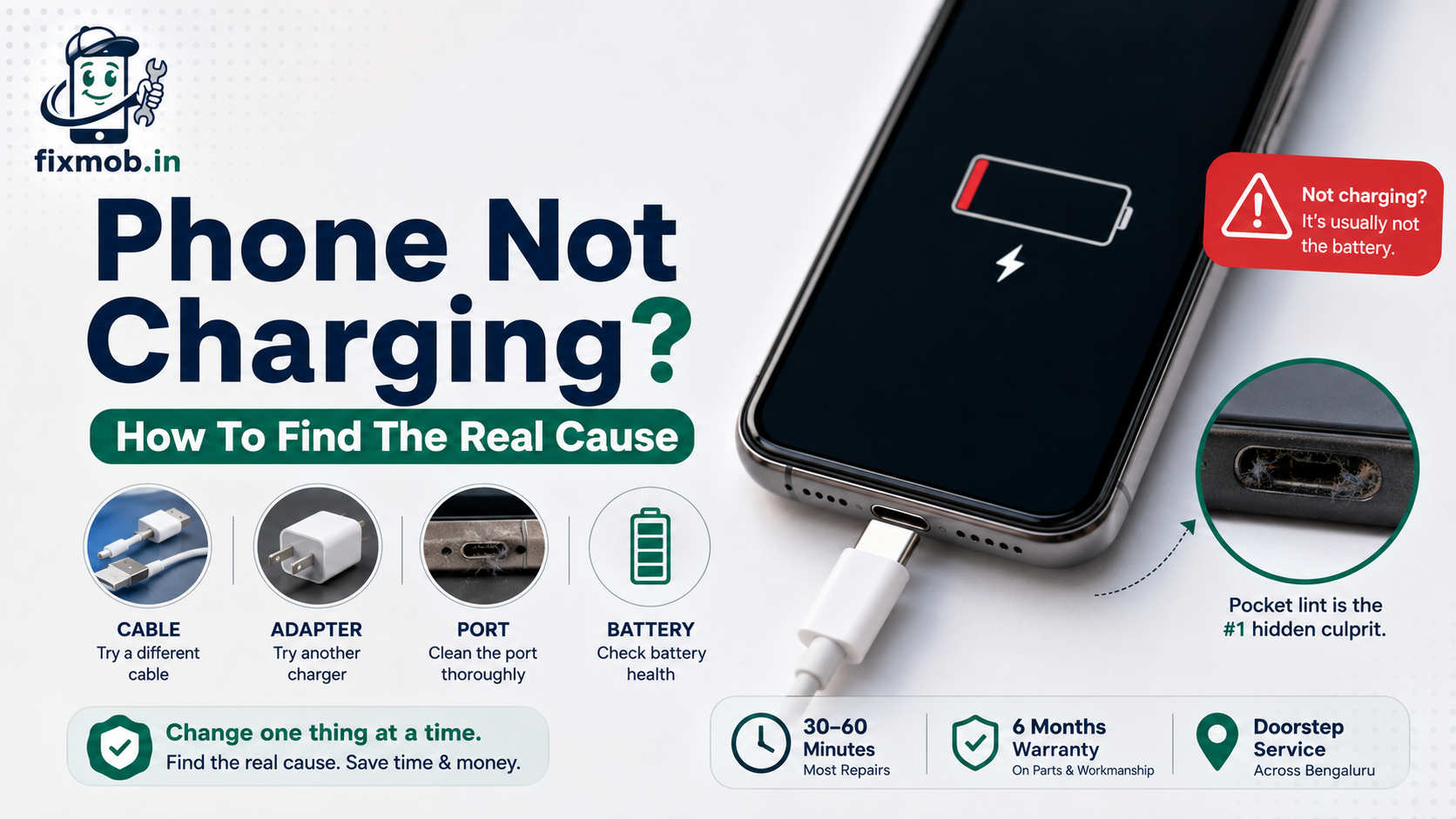
Phone Not Charging? How To Find The Real Cause
A phone not charging is usually a cable, adapter, or port problem, so swap the cable, try another charger, and clean the port before assuming the battery has failed.
Most people replace the battery first. It is the most expensive part of the chain and the least likely culprit.
Key Takeaways
• Change one thing at a time, or you will never know what fixed it
• Cables fail internally far more often than adapters do
• Compacted pocket lint is the most common port fault of all
• A port that only works at one angle is worn, not dirty
• Never poke a metal pin into the connector
|
Fact |
Detail |
|
First test |
A different cable and a different adapter, one change at a time |
|
Common cause |
Lint compacted into the bottom of the charging port |
|
Turnaround |
30 to 60 minutes for port cleaning or replacement |
|
Warranty |
6 months on parts and workmanship |
|
Coverage |
Doorstep and pickup across Bengaluru |
What Are The Most Common Reasons For A Phone Not Charging?
Four parts sit between the wall and the battery, and any of them can break. In order of how often they fail, the cable goes first, then the port, then the adapter, and only rarely the battery or the board behind it.
|
Part |
How it usually fails |
How to confirm |
|
Cable |
Internal wires break near the ends |
Try a different cable |
|
Charging port |
Lint packs in, or pins wear down |
Try a different cable and inspect with a torch |
|
Adapter |
Output drops or dies completely |
Try a different wall charger |
|
Battery |
Holds no charge, swells, shuts down early |
Check battery health, watch for heat |
|
Board or IC |
Nothing charges on any cable or charger |
Needs a technician |
The order matters. Testing the cheap, easy items first means you either fix a phone not charging for free, or you arrive at a repair shop already knowing what to ask for.
How Do You Tell If It Is The Cable Or The Charger?
Swap one at a time. Use your cable with a different adapter, then your adapter with a different cable, and whichever combination charges tells you which part died. Changing both at once teaches you nothing.
Cables fail more often because they get bent, wound tightly, and yanked out sideways. The copper inside breaks near the strain point while the outer sleeve still looks perfect.
It is the least dramatic explanation for a phone not charging and the most likely one, which is why a spare cable is worth keeping purely as a test tool.
Watch for these signs before you blame the phone:
• Charging only works when the cable is held at a certain angle
• The connector feels hot near the plug
• The sleeve is kinked, flattened, or split near either end
• It charges some devices but not others
Cheap cables also fail quickly because they are never tested against the standard. The USB Implementers Forum certifies cables and connectors only after testing that includes 10,000 insertion cycles, which is exactly the kind of durability an uncertified cable has never been checked for.
How Do You Know The Charging Port Is The Problem?
Look inside with a torch. A charging port not working is usually packed with compressed lint that stops the connector seating fully, and you can often see the grey plug of fluff sitting at the bottom of the slot.
The tell is mechanical rather than electrical. If the cable does not click in as deeply as it used to, or wobbles once seated, the obstruction or the wear is in the port.
• The cable falls out easily or sits loose
• Charging starts and stops as you move the phone
• It only charges when pressed in at an angle
• Nothing charges, on any cable, from any socket
• The port looks dark or fluffy under a torch
A phone not charging on every cable you own, from every socket in the house, is pointing at the port or the board rather than the accessories.
Can You Clean A Charging Port Safely At Home?
Yes, carefully, and only with the phone switched off. A wooden toothpick or a dry nylon brush lifts compacted lint without shorting anything, and this alone fixes a large share of cases where the connector has stopped seating properly.
1. Switch the phone off completely before touching the port
2. Shine a torch in and look for a compacted grey plug at the base
3. Scrape gently with a wooden toothpick, working from the back forward
4. Tip the phone and tap it so the loosened debris falls out
5. Repeat until the cable clicks in with its old, firm seat
Do this before you pay anyone. A phone not charging because of packed pocket lint is one of the most common cases a technician sees, and it takes two minutes to rule out at home.
Three things not to do, because each one causes damage a technician then has to repair:
• No metal pins, needles, or SIM ejectors, which bend or short the contacts
• No compressed air, which drives debris further in
• No liquid cleaners of any kind inside the connector
Why Is Your Phone Charging Slowly Rather Than Not At All?
Slow charging is a different fault from no charging. It usually means the cable or adapter cannot negotiate full power, the port connection is partial, or the phone has throttled charging because it is hot.
Work through the likely causes in this order:
• A low output adapter, such as an old 5W brick on a modern handset
• A cable that carries data but only trickle power
• Heat, since phones deliberately slow charging when warm
• Background apps or games running while plugged in
• A partly obstructed port making an incomplete connection
Charging while gaming is the one people rarely believe. The phone can be drawing almost as much as it receives, so the percentage barely moves even though nothing is broken.
When Is It The Battery Rather Than The Port?
When the phone charges normally but does not hold it. A worn cell accepts power, shows a rising percentage, then drops sharply, shuts down above 20 percent, or runs hot while idle, which is a battery problem rather than a phone not charging problem.
The two faults feel similar and get confused constantly, so the distinction is worth being clear about. A port fault stops power getting in. A battery fault means power gets in and leaks straight back out.
The signs your phone battery needs replacement cover the pattern in detail. Swelling is the one symptom to treat as urgent rather than inconvenient, because a bulging cell puts pressure on the display from behind.
Does Water Damage Cause Charging Failure?
Frequently, and it is the cause people forget. The charging port opens directly to the outside, so it collects moisture first, and corrosion on those pins can stop charging days or weeks after the phone got wet.
Corroded contacts often look slightly green or white under a torch. Cleaning the lint out will not help, because the damage is chemical rather than physical.
If the phone has been rained on or dropped in liquid recently, our guide on what to do with a water damaged phone explains why speed matters so much here.
What Does A Charging Port Repair Actually Involve?
Cleaning first, replacement second. A technician inspects the connector under magnification, cleans corrosion or debris, and only replaces the port assembly if the pins are worn, bent, or damaged beyond a clean.
On most Android handsets the port sits on a small daughterboard that unclips, which makes it a quick job. On some models, and on iPhones, it is soldered to the main board, so a charging port repair there needs microsoldering rather than a simple swap.
That difference is why quotes vary so much between models. Ask which type your handset uses first, because a phone not charging through a soldered port is a very different job from a clip in one.
FixMob covers charging port and board level repair services for both types, with the diagnosis done before anything is charged for.
Frequently Asked Questions
Why Is My Phone Charging So Slowly?
Usually a low output adapter, a cable that only trickles power, or heat throttling. Try a higher rated charger and let the phone cool before deciding anything is broken.
Can A Dirty Charging Port Really Stop Charging Completely?
Yes. Compacted lint stops the connector seating deep enough to make contact, so the phone behaves exactly as though the port were dead.
Is It Safe To Use A Third Party Charger?
Yes, if it is a certified one from a known brand. Uncertified adapters are the ones that damage batteries, cause erratic touch response, and fail early.
My Phone Charges Only When I Hold The Cable. What Is That?
Worn port contacts or a broken cable end. Test another cable first, and if the angle trick is still needed, the port needs replacing.
Does Charging Overnight Damage The Battery?
Not on modern phones, which stop drawing power when full. Heat does far more damage, so charging under a pillow is the real thing to avoid.
How Long Does A Charging Port Replacement Take?
Usually 30 to 60 minutes on models where the port sits on its own small board. Soldered ports take longer and need workshop equipment.
What Should You Do Next?
Run the cheap tests in order: another cable, another adapter, another socket, then a torch and a toothpick in the port. Most cases of a phone not charging end there, with nothing spent.
If none of it works, book a doorstep or pickup repair and ask for the port to be inspected before any part is ordered. A cleaning that solves it should never be billed as a replacement.