Phone Mic Not Working? Why People Cannot Hear You
Your calls connect, the other person speaks clearly, and then they ask why you have gone quiet. Nothing on your side looks broken.
A phone mic not working is one of the easiest faults to misdiagnose, because your handset has three or four microphones and only one of them may have failed. This guide finds the faulty one first.
The Essentials
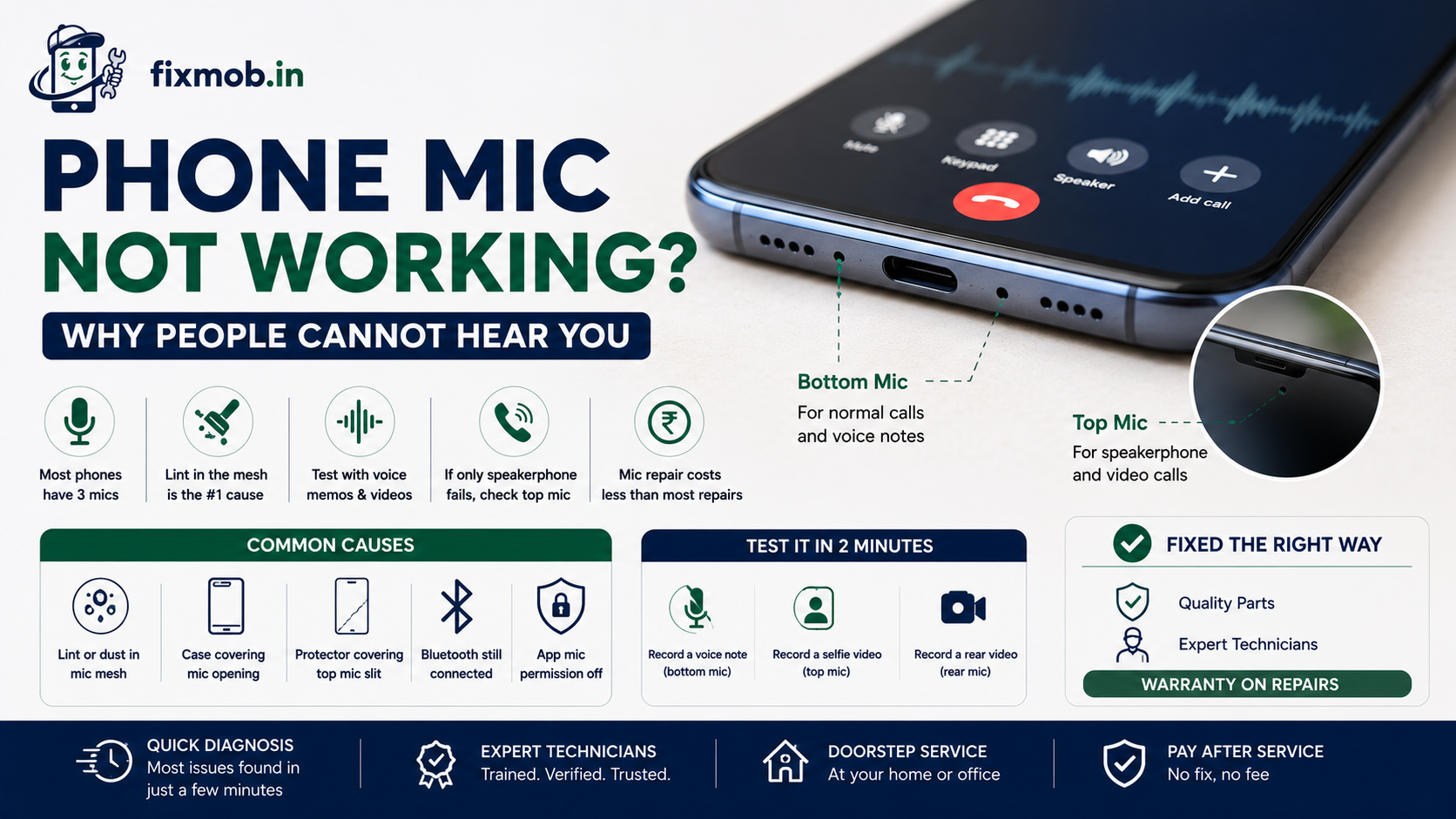
• Most phones carry three microphones, so one failing does not kill all audio
• Lint packed into the bottom mic mesh is the single most common cause
• Voice Memos and a selfie video will identify the faulty mic in two minutes
• If only speakerphone fails, the top microphone is the suspect
• A microphone repair usually costs less than a screen or battery replacement
Why Is Your Phone Mic Not Working?
A phone mic not working almost always comes from one of four things: debris blocking the mic mesh, a case or screen protector covering the opening, an app permission or Bluetooth setting stealing the input, or a damaged microphone flex after water contact or a drop.
Debris leads the list by a wide margin. Pocket lint compacts into the bottom mic hole over months until it forms a plug that muffles you without blocking sound entirely.
That gradual build up explains why a microphone not working on phone calls so often feels sudden. The decline happens over weeks, and you only notice on the day someone finally says they cannot hear you.
The full list of causes, roughly in order of how often we see them:
• Lint or dust packed into the bottom microphone mesh
• A thick case that sits over the microphone opening
• A screen protector covering the narrow top microphone slit
• Bluetooth still routing audio to a car kit or earbuds in a drawer
• App permissions switched off for the app you are using
• Noise cancellation misreading a blocked mic and suppressing your voice
• Water damage corroding the microphone contacts weeks after the spill
• A torn flex cable on the charging port board, which carries the bottom mic on many models
• Audio IC failure on the motherboard, the least common and the most expensive
Two of those causes overlap with charging faults, because on many phones the same flex carries both. If your handset has also been slow or unreliable to charge, our guide to finding the real cause of a phone not charging is worth reading alongside this one.
Which Microphone Has Failed?
Match your symptom to the microphone. A phone mic not working in normal calls but fine in voice notes almost never happens, because both use the bottom mic. What varies is which activity uses which microphone, and that is what tells you where the fault sits.
|
What fails |
Microphone involved |
Where it sits |
Common cause |
|
Normal handset calls |
Primary mic |
Bottom edge, beside the charging port |
Lint or a torn port flex |
|
Speakerphone and video calls |
Top mic |
Top edge or in the earpiece slot |
Screen protector or dust |
|
Rear camera video audio |
Rear mic |
Beside the rear cameras |
Case blocking the opening |
|
Everything at once |
Audio IC or software |
On the motherboard |
Board fault or a settings issue |
|
Only one app |
None, permissions only |
Not a hardware fault |
Permission switched off |
The last two rows matter most. If every microphone fails simultaneously, stop cleaning and start looking at settings or the board, because three separate microphones do not die on the same day by coincidence.
Knowing the location also protects you at the counter. A shop quoting a full board repair for a phone mic not working that only affects speakerphone is quoting for the wrong fault.
The board row is the one to take seriously. When the audio circuit itself has failed, the job moves into phone motherboard repair, which carries a different price and a different timeline.
How Do You Test It In Two Minutes?
Run these five checks in order. By the end you will know which microphone is at fault, and whether the phone mic not working is something you can fix at your desk in the next ten minutes.
1. Record a voice note. Open Voice Memos or your recorder app, speak at the bottom edge, then play it back. Silence or muffling means the primary mic.
2. Record a selfie video. Speak while filming with the front camera. This uses the top mic.
3. Record a rear camera video. Same test, different microphone.
4. Make a speakerphone call. If only this fails, the top microphone is confirmed.
5. Turn Bluetooth off entirely. Then repeat the call. A forgotten pairing is a common false alarm.
Apple’s own guidance for a microphone that is not working starts in the same place: remove any case or screen protector, clear debris from the openings, then record and play back a memo to confirm.
Is It Dust, Software, Or Hardware?
Dust and software account for most cases, and both are free to rule out. Only after those two are eliminated does hardware become likely, and a phone mic not working caused by hardware usually has a story attached, such as a drop, a spill, or a recent cheap repair.
|
Clue |
Likely cause |
What to do |
|
Voice sounds muffled, not absent |
Blocked mic mesh |
Clean gently with a soft dry brush |
|
Started after a case change |
Case covering the opening |
Remove the case and retest |
|
Fails in one app only |
App permission |
Check microphone permission in settings |
|
Started after a spill |
Corroded contacts |
Get it opened and cleaned soon |
|
Started after a screen repair |
Disconnected mic flex |
Return to the technician |
|
No mic anywhere, no history |
Audio IC or software |
Board level diagnosis |
Clean carefully if you try it yourself. Never push a pin or a paperclip into a mic hole, because the mesh behind it tears easily and a cleaning job becomes a parts job.
What Does A Microphone Repair Cost?
Expect roughly 800 to 2,500 rupees for a microphone or charging port flex replacement, and 2,500 to 5,000 rupees or more if the fault sits in the audio circuit on the motherboard. Confirm against a written quote for your specific model before agreeing.
|
Repair |
Indicative range |
Typical time |
|
Deep cleaning of the mic mesh |
Often free with a diagnosis |
10 to 20 minutes |
|
Microphone or port flex replacement |
800 to 2,500 rupees |
30 to 60 minutes |
|
Water damage cleaning and mic repair |
1,500 to 4,000 rupees |
2 to 4 hours |
|
Audio IC or board level repair |
2,500 to 5,000 rupees and up |
4 hours to a day |
These are market ranges across Bangalore rather than a fixed price list. The good news is that the microphone replacement cost sits at the cheap end of phone repairs, well below a display or a battery on most models.
One caution on price. On many models the primary mic lives on the charging port flex, so a quote may name the port rather than the mic. That is normal, not an upsell, because the two parts come as one.
Ask about cover as well as cost. A cheap microphone swap with no warranty on repairs is a false economy when the part itself is this inexpensive.
When Is It Not The Microphone At All?
Sometimes the microphone is perfectly healthy and something upstream is at fault. Water damage is the classic example, because corrosion often reaches the audio circuit weeks after the phone appeared to dry out and recover completely.
Watch for these signs that the fault runs deeper:
• The phone was in water or heavy rain in the past two months
• Speaker, mic, and vibration all became unreliable around the same time
• The fault appeared immediately after a screen or battery replacement elsewhere
• Calls also drop or the network signal became unstable
There is a pattern worth remembering here. A phone mic not working alongside a second unrelated symptom is rarely a microphone problem, and treating it as one wastes a repair.
Corrosion spreads, so it is the one cause worth acting on quickly. Our guide on why a water damaged phone needs proper cleaning explains what actually happens inside the phone long after the outside looks dry.
Frequently Asked Questions
Why can people not hear me on calls but voice notes work?
That combination usually means noise cancellation is suppressing your voice, or the earpiece and top mic path is faulty. Test speakerphone next to narrow it down.
Can I clean the microphone myself?
Yes, with a soft dry brush or a puff of air. Never insert a pin, and never spray liquid or compressed air directly into the opening, as both damage the mesh.
Does a screen protector cause a phone mic not working?
It can. A protector cut slightly too large covers the narrow top microphone slit, which kills speakerphone and front camera audio while normal calls stay fine.
Will a factory reset fix it?
Only if the cause is a software or permission problem. A reset erases your data and cannot clear a blocked mesh, a torn flex, or corrosion from a spill.
How long does a microphone replacement take?
Most microphone and port flex replacements take 30 to 60 minutes. Water damage cleaning takes longer because the board has to be opened, cleaned, and dried properly.
Is the microphone covered by warranty?
Usually yes within the warranty period if there is no physical or liquid damage. Any liquid indicator that has triggered will normally void the claim.
Who Should You Call First?
Work through the cleaning, the case, the permissions, and the Bluetooth check first, because those four solve a large share of cases at no cost. If all four fail, the fault is inside the phone and guessing further only delays the repair.
A technician can confirm which of your microphones has failed in a few minutes and quote before touching anything. Get your phone mic not working diagnosed at your doorstep and book a repair with FixMob whenever suits you.