How A Fake Phone Charger Damages Your Battery And Board
That 65W adapter on a footpath stall costs 250 rupees. The branded one costs 2,000. The gap is not marketing.
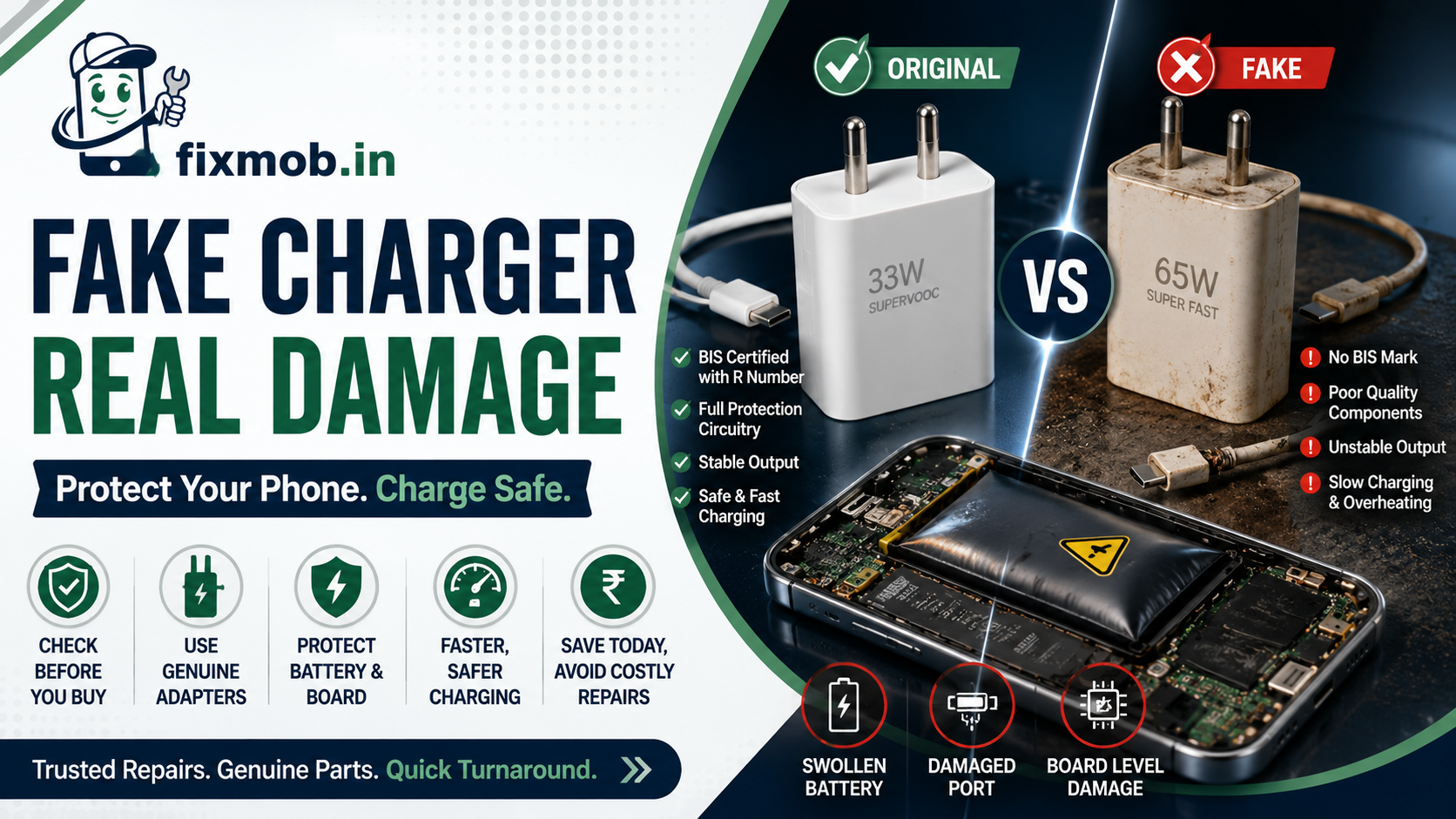
A fake phone charger leaves out the components that keep 230 volt mains away from your handset. Your battery, your charging port, and your motherboard absorb the difference, usually over months rather than in one dramatic moment.
The Short Version
• Counterfeit adapters skip isolation and protection parts worth a few rupees
• Unstable output causes ghost touch, port damage, and swollen batteries
• Genuine adapters sold in India carry a BIS mark with an eight-digit R number
• Weight, print quality, and pin finish expose most counterfeits in seconds
• Charging IC damage is board-level work, not a cable swap
What Makes A Fake Phone Charger Different From A Real One?
A fake phone charger removes the parts you cannot see. A genuine adapter contains an isolation transformer, an optocoupler, and a Y-capacitor that keep mains voltage separated from the five volt output. Counterfeits thin those parts down or delete them entirely.
The savings come from specific omissions:
• Creepage distance between the mains side and the output side cut to under a millimetre
• Ordinary insulation tape standing in for a proper moulded barrier
• No thermal cutoff, so a fault keeps heating instead of shutting down
• Filtering capacitors undersized, letting ripple pass through to the phone
• A 65W figure printed on a shell that collapses to single digits under load
Ripple is the part people underestimate. Your phone expects steady direct current, and a noisy supply forces the charging circuit to work around voltage that keeps moving. That circuit is soldered to the board, so it cannot simply be unplugged when it fails.
How Can You Identify A Fake Charger Before You Buy It?
Weigh it, then read it. A genuine 33W adapter holds a real transformer and a heatsink, so it feels dense for its size, while a fake phone charger feels hollow and sometimes rattles. Knowing how to identify a fake charger takes about ten seconds once you know where to look.
Run through this before you pay:
• Weight. Hollow and light for its size is the first red flag
• Pins. Genuine pins are brass, evenly plated, and firm in the housing
• Label. Look for a model number, an input range of 100 to 240 volts, the IS number, and a BIS registration number
• Print quality. Blurry fonts, wrong spacing, and misspelt brand names settle the question
• Seams. Glue squeeze-out and uneven moulding mean it was assembled by hand
• Price. A genuine 65W PD adapter does not sell for 300 rupees
• Cable. High-wattage USB-C cables carry an e-marker chip, and fakes almost never do
Buying from an authorised retailer removes most of this guesswork. Roadside stalls, marketplace sellers with no brand storefront, and anything sold loose without a box deserve the full checklist.
It helps to know what you are choosing between, because the middle option is the one most people misjudge.
|
Subject |
In-box or brand adapter |
Certified third party |
Counterfeit |
|
Price signal |
Highest |
Sensible for the wattage |
Too cheap to be real |
|
Markings |
Full label with R number |
Full label with R number |
Logo copied, number absent or invalid |
|
Inside |
Full isolation and protection |
Full isolation and protection |
Thinned or missing |
|
Your phone’s response |
Full rated speed |
Full rated speed |
Falls back to slow charging |
A certified third-party adapter from a registered brand is not a compromise. It carries the same protection circuitry and the same paperwork, and it usually costs a third of the branded original.
The risk sits entirely with the unregistered copy, and it lands on parts that are not cheap to replace. The list of repair services shows which of them a charging fault typically reaches.
Why Does A Duplicate Charger Slow Your Charging Down?
Because fast charging is a negotiation, and a duplicate charger usually fails it. Your phone and the adapter exchange a handshake over the USB data lines to agree on voltage. When the counterfeit cannot complete that exchange, the phone falls back to the safest option, which is five watts.
That is why a phone plugged into a fake phone charger overnight can still show 60 percent in the morning. The adapter is not broken in a way you can see. It simply never qualified for the higher power profile it advertises on the shell.
Three things commonly cause the slowdown:
• The adapter has no protocol chip, so PD and Quick Charge never activate
• Thin conductor wire in the bundled cable drops voltage over its length
• Loose pins break contact whenever the phone moves on the table
Heat makes it worse. A poorly regulated supply warms the battery, and the phone then throttles its own charging speed to protect the cell. That is exactly the behaviour people mistake for age, and our battery replacement guide sets out how to tell the two apart.
Does The Cable Matter As Much As The Adapter?
Nearly as much, and it fails more often. The cable carries the current and the negotiation signals, so a thin or uncertified one throttles a perfectly good adapter and heats up while doing it. Most charging complaints that turn out to be accessories start at the cable.
Two things separate a real cable from a copy:
• Conductor thickness. Thin wire drops voltage over its length, so the phone receives less than the adapter sends. The loss turns into heat inside the insulation
• The e-marker chip. USB-C cables rated above 60 watts carry a small chip that declares their capacity. Without it the phone caps the current, whatever the packaging claims
You can feel the difference. Run a charge for fifteen minutes, then touch the connector at both ends. Warm is normal, but a connector too hot to hold comfortably means resistance where there should be none, and that resistance sits millimetres from your charging port.
Appearance is a poor guide here. A cable can look premium, feel heavy, and still be built around undersized conductors, which is why the heat test settles the question faster than an inspection does.
What Damage Does A Bad Adapter Actually Do To Your Phone?
It damages three things in a predictable order: the battery first, then the charging port, then the board. Each stage costs more than the last, and the fake phone charger that started it usually still looks perfectly fine.
|
What you notice |
What is happening inside |
Usual repair |
|
Phone hot while charging |
Poor regulation pushing heat into the cell |
Battery replacement |
|
Screen taps by itself when plugged in |
Voltage ripple confusing the touch layer |
Charger swap, sometimes a display |
|
Charging starts and stops |
Failed handshake or worn contacts |
Port cleaning or port replacement |
|
Back panel or screen lifting |
Cell swelling from sustained stress |
Urgent battery replacement |
|
Phone dead after a plug-in |
Charging IC destroyed by a spike |
Board-level microsoldering |
Swelling is the one to act on immediately. A cell under sustained stress pushes against the back panel or the screen, and a phone in that state should be taken off charge until a technician sees it.
At the far end sits the charging IC, the chip that manages power on the way in. When a spike takes it out the phone stops responding to any charger at all, and recovery becomes phone motherboard repair rather than a parts swap.
How Do You Check If A Charger Is BIS Certified?
Look for the BIS standard mark with an eight-digit registration number, then verify that number. Adapters sold in India fall under the Compulsory Registration Scheme, so a BIS certified charger carries the mark, the IS number, and a traceable R number, while a fake phone charger copies the logo and stops there.
The Bureau of Indian Standards publishes a free consumer app for exactly this. Its Verify R-No under CRS feature accepts a valid eight-digit R number and returns the registered manufacturer behind it, and the same app accepts complaints about misuse of the CRS mark.
Three outcomes are worth knowing:
• The number checks out and matches the brand. The adapter is registered
• The number checks out but names an unrelated manufacturer. The mark was copied
• There is no number at all, only a BIS logo. Treat it as counterfeit
A printed logo alone proves nothing, because a logo is the easiest thing in the world to copy. The number is the part that has to survive a lookup.
What Should You Do If You Have Been Using One?
Stop charging with it tonight, then check what it has already cost you. Most damage from a fake phone charger builds gradually, so a phone that still works can be several months into a problem that has not surfaced yet.
Work through these five steps:
1. Switch adapters. Use the in-box charger or a certified replacement from an authorised seller
2. Check battery health. iPhone users open Settings, then Battery, then Battery Health and Charging. Many Android phones show the same data in settings or a diagnostic menu
3. Inspect the port. Shine a torch inside and look for blackening, bent pins, or melted plastic
4. Test the charging speed. Note the percentage gained in 30 minutes on a good adapter and compare it against what the phone is rated for
5. Book a check. Heat, swelling, or intermittent charging needs a technician rather than another cable
If the port or the cell is already affected, the fix is straightforward when caught early. You get an estimate after inspection and before any work starts, which is set out in full on our transparent repair pricing page.
Frequently Asked Questions
Can a fake phone charger damage my phone permanently?
Yes. A voltage spike can destroy the charging IC on the motherboard, which stops the phone charging from any adapter and needs microsoldering to repair.
Is a cheap local charger the same as a counterfeit one?
Not always. A budget adapter from a registered brand can be genuine, while a duplicate charger copies another brand’s markings and skips the safety components entirely.
Does using a non-original charger void my warranty?
Using a certified third-party adapter normally does not. Damage traced to an uncertified or counterfeit adapter is usually treated as user-caused and excluded from cover.
Can a bad charger really cause ghost touch?
Yes. Electrical noise from an unfiltered supply interferes with the touch layer, which is why random taps often appear only while the phone is plugged in.
Is wireless charging safer than a cheap adapter?
Only if the wireless pad itself is certified. The pad still runs off a wall adapter, so an uncertified brick behind it carries the same risks.
How much does charger-related damage cost to fix?
It depends on how far it went. A port clean is minor, a battery or port replacement is moderate, and charging IC repair at board level is the most expensive outcome.
Ready To Get Your Charging Checked?
If your phone runs hot, charges slowly, or shows a lifting back panel, the adapter is the first suspect. Book a doorstep repair and a technician will test the port, the cell, and the charging circuit in front of you. Replacing a fake phone charger costs far less than replacing what it damages.