Screen Replacement Explained: Signs, Costs, and Fair Prices
A cracked screen is the most common phone injury there is, and also the most misunderstood. People often overpay, accept a poor-quality panel, or delay until a small crack kills the touch layer.
This guide explains screen replacement in plain terms: the signs you actually need one, why glass breaks, what a fair price looks like, and how to avoid paying too much. Whether the glass is spider-webbed or the display has gone black, you will know your options.
Getting these basics right saves both money and a second trip to the technician, and it helps you tell a fair quote from a rip-off.
Key takeaways
• A cracked screen can fail touch, brightness, or the display entirely
• On most phones the glass and display are one bonded part
• Genuine or high-grade panels outlast cheap copies by years
• A tempered glass protector is the cheapest way to prevent the next crack
What are the signs you need a screen replacement?
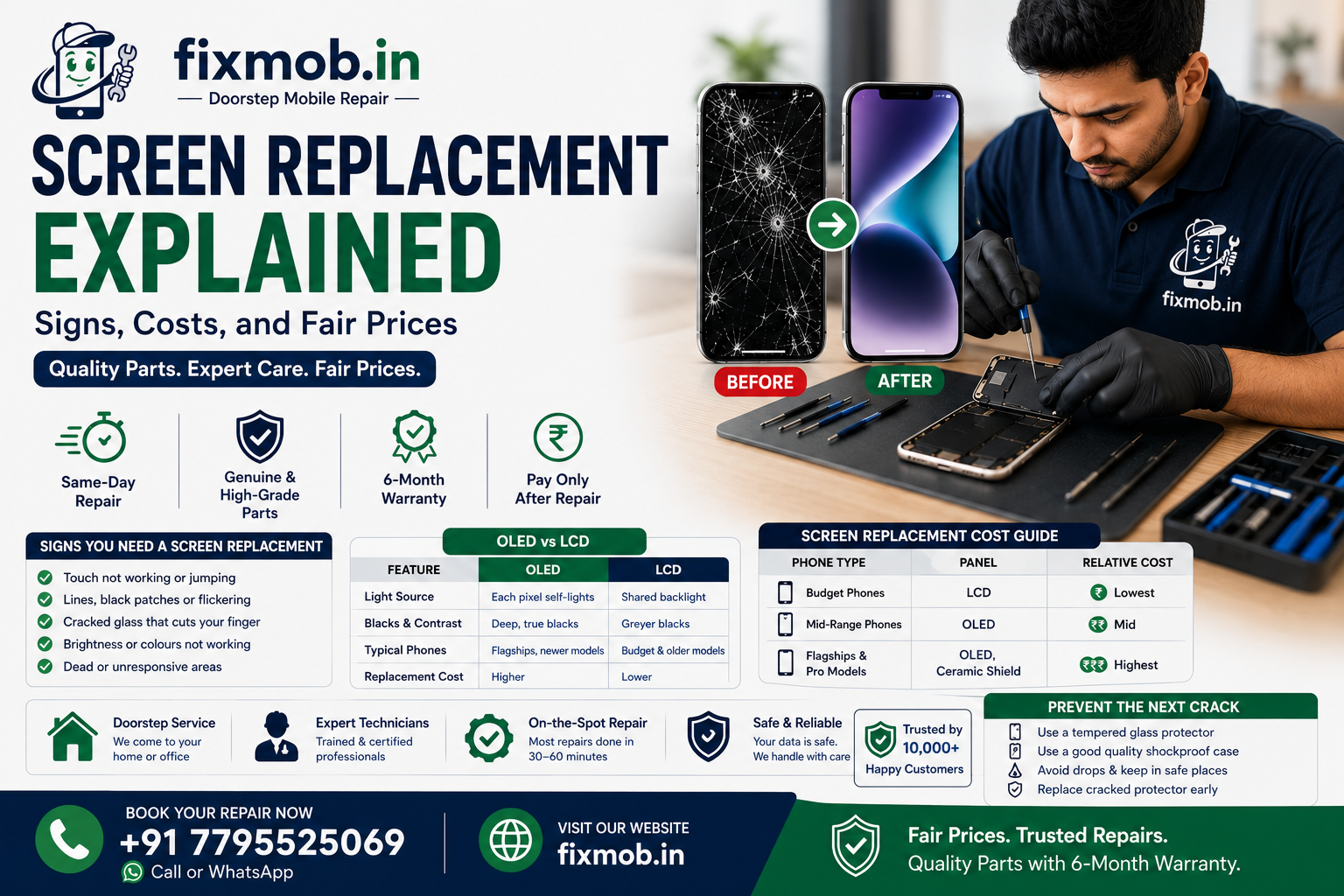
You need a screen replacement when the damage affects use, not just looks. Deep cracks, dead or flickering areas, unresponsive touch, lines across the display, or ink-like black blots all mean the panel should be swapped before the fault spreads further.
Clear signs it is time to act include:
• Touch that misses, jumps, or stops in places
• Lines, bands, or black patches on the display
• Glass so cracked it cuts or catches your finger
• Backlight or colour that has failed in part of the screen
Is it the glass, the display, or both?
On most modern phones, the glass and the display are bonded into one module, so a shattered front usually means replacing the whole assembly. Only some older or budget phones let a technician swap the outer glass on its own.
This is why a quote for a new screen is rarely just for glass. You can find the exact part in the list of repair services for your model, which keeps the pricing honest and specific.
Which phones and brands can have the screen swapped?
Almost all of them. Technicians replace panels on Apple, Samsung, OnePlus, Xiaomi, Vivo, Oppo, Realme, Google, and Motorola phones, from budget models to the latest flagships. The exact part and price differ by model, but the process is broadly the same across brands.
Common devices that get a new panel include:
• iPhones, from older models to the newest Pro versions
• Samsung Galaxy S, A, and Note series
• OnePlus, Xiaomi, Redmi, and Poco handsets
• Vivo, Oppo, Realme, and Google Pixel phones
Does screen size or phone model change the repair?
Yes, quite a bit. Larger and curved displays, like those on flagship Samsung and Pro iPhones, cost more and take slightly longer, because the panels are pricier and trickier to seal. Flat, smaller screens on budget phones are quicker and cheaper to fix.
Model factors that affect the job include:
• Curved or edge displays are dearer and more delicate
• Larger panels cost more than compact ones
• Under-display fingerprint sensors add a calibration step
• Newer flagships often use tougher, costlier glass
Why do phone screens crack so easily?
Because glass is hard but brittle, while phones are thin and heavy. Even toughened glass has limits. Corning notes that its Gorilla Glass Victus 2 survived lab drops of up to one metre onto concrete, yet a bad angle or a rough surface can still shatter a panel.
A few factors explain most breakages:
• Corner-first drops concentrate force on a single point
• Rough surfaces like concrete are far harsher than wood
• Bigger, heavier phones hit the ground with more energy
• Existing micro-cracks weaken the glass over time
How much should a screen replacement cost?
A screen replacement costs more for flagships than for budget phones, because OLED and Ceramic Shield panels are dearer than basic LCDs. The model, the panel type, and the part grade set the price, so any quote should name all three before work begins.
|
Phone type |
Panel |
Relative cost |
|
Budget phones |
LCD |
Lowest |
|
Mid-range phones |
OLED |
Mid |
|
Flagships and Pro models |
OLED, Ceramic Shield |
Highest |
Original, aftermarket, or refurbished: which panel is best?
It depends on your budget and priorities. Original panels match factory quality and price, high-grade aftermarket panels offer strong value, and refurbished originals sit in between. The key is knowing exactly which one you are paying for before you agree.
|
Panel type |
Quality |
Best for |
|
Original |
Factory-grade |
Flagships and warranty peace of mind |
|
High-grade aftermarket |
Very good value |
Everyday phones on a budget |
|
Refurbished original |
Good, but varies |
Balancing cost and quality |
Whatever the grade, insist that it is stated clearly on your quote and backed by a written warranty.
How do you avoid overpaying for a screen repair?
Compare like for like and insist on part quality. The cheapest screen replacement often hides a duplicate panel that fails fast, while the dearest is not always genuine. Ask for the part grade, a written warranty, and a model-specific quote before you agree to anything.
To pay a fair price, do the following:
• Ask whether the panel is genuine or high-grade compatible
• Get the quote against your exact model, in writing
• Confirm the warranty length and what it covers
• Insist on genuine and high-quality parts
• Choose pay-after-service so you check before paying
Can you prevent the next cracked screen?
Yes, mostly. A good tempered glass screen protector and a shock-absorbing case take the brunt of most drops. They cannot stop every impact, but they turn many screen-cracking falls into a scratched protector instead of a shattered panel.
A few simple habits save screens:
• Fit a tempered glass screen protector from day one
• Use a case with raised edges around the screen
• Keep the phone out of back pockets and loose bags
• Replace a cracked protector promptly rather than later
What happens if you keep using a cracked screen?
It usually gets worse, and sometimes dangerous. A small crack spreads with every flex and drop, sharp glass can cut a finger, and gaps let in dust and moisture that reach the display and the board. Touch can also start failing along the crack lines.
Ignoring a cracked screen risks:
• Glass splinters that cut fingers or ears
• Dust and moisture reaching the display and board
• Touch that fails progressively along the cracks
• A cheap fix turning into a costly board repair
How does the replacement process work?
A technician heats and lifts the old panel, transfers sensors like the front camera and Face ID flex, fits the new display, and tests everything. Done well, a phone screen repair takes about 30 to 60 minutes and is sealed before you sign off.
1. Back up your phone and note the exact model
2. The technician removes the damaged panel carefully
3. Sensors are transferred and the new display is fitted and sealed
4. Touch, brightness, and cameras are tested before you pay
You can find more device guides on the FixMob blog if you want to understand your specific model first. Knowing what to expect also makes it easier to spot a rushed or careless job before you pay.
Should you replace the screen yourself or use a professional?
For most people, a professional is the safer bet. DIY kits exist, but bonded panels, delicate flex cables, and sensor calibration make mistakes easy and expensive. A trained technician gets the panel sealed, tested, and warranted.
|
Option |
Upside |
Risk |
|
DIY kit |
Looks cheaper upfront |
Easy to damage flex or sensors |
|
Local professional |
Sealed, tested, warranted |
A small premium over parts alone |
Frequently asked questions
How long does a screen replacement take?
Most take 30 to 60 minutes once the correct panel is in hand. A doorstep screen replacement is usually finished the same day when the part is in stock.
Will a new screen affect Face ID or fingerprint?
A careful repair transfers those sensors, so Face ID or the fingerprint reader keeps working. Faults here usually mean a sensor was not transferred correctly.
Is a cheap screen repair worth it?
Rarely. A very low price often means a duplicate panel with weak colour, poor touch, or a short life, which can cost more when it fails early.
Do I need phone screen repair for a hairline crack?
Not always, but a hairline crack can spread and let in dust or moisture. Fitting a protector and watching it is a reasonable first step.
Does replacing the screen reset my data?
No. Replacing the screen is a hardware swap and does not erase your data, though a backup before any repair is always sensible.
Can a screen protector really prevent cracks?
A quality tempered glass protector absorbs and spreads impact, preventing many cracks. It will not survive every drop, but it is cheap insurance for the screen.
Ready to fix that cracked screen the right way?
A broken screen does not have to mean a broken budget. Book a screen replacement, pick a doorstep slot, and let a certified technician fit and test a quality panel in front of you. Genuine-grade parts, a 6-month warranty, and pay-after-service come as standard.