Green Line On Phone Screen? Why It Happens And How To Fix It
One morning the phone is fine. The next, a thin bright line runs from the top of the display to the bottom and refuses to go away.
The green line on phone screen problem has become one of the most common display complaints in India, and almost every case has the same answer. This guide explains why, and what it costs.
Quick Answer
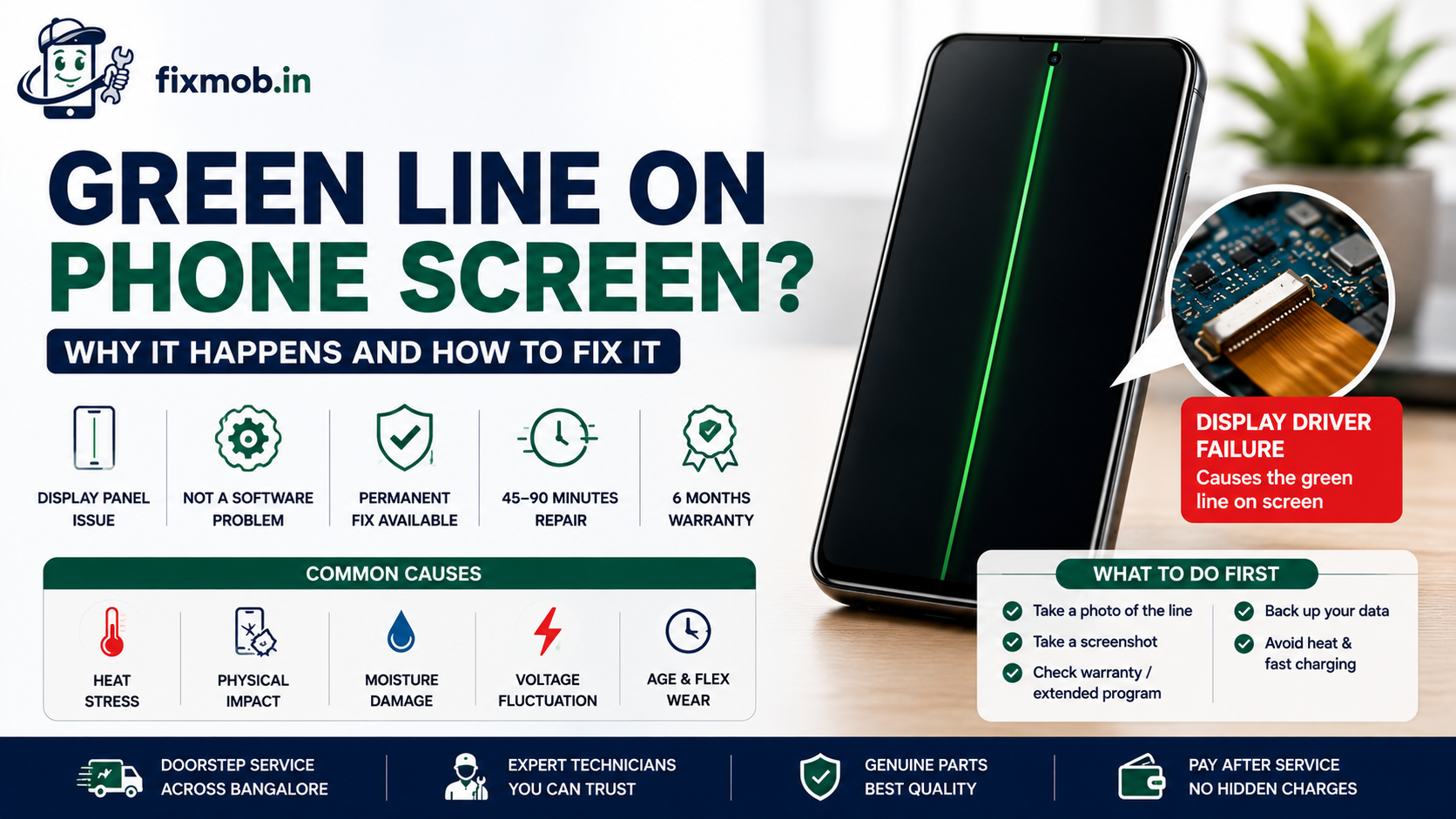
• The fault sits in the display panel, not in the software
• AMOLED and OLED screens are affected far more often than LCD
• No reset, update, or app removes it once the panel driver has failed
• Samsung, OnePlus, iQOO, Vivo, Xiaomi, and OLED iPhones all see it
• A panel replacement in Bangalore typically runs 4,000 to 15,000 rupees
What Causes A Green Line On Phone Screen?
A green line on phone screen displays is a hardware fault. The row of driver circuitry that controls one column of pixels stops receiving a correct signal, so those green sub pixels stay lit at full brightness while everything around them behaves normally.
That failure usually traces back to one of five things:
• Heat stress: long gaming or charging sessions cook the flexible display connector
• Micro fractures: a drop that left no visible crack can still fatigue the panel edge
• Moisture: humidity or sweat reaching the ribbon cable corrodes the contacts
• Voltage spikes: a poor quality charger sends unstable power to the display driver
• Age and flex: the bonding between the panel and the driver weakens over years of use
Notice what is missing from that list. Nothing about apps, updates, or storage, because none of them can light a pixel that the panel is no longer controlling.
Most owners report no drop at all, which is exactly why the fault feels so unfair. If your phone also runs hot during long sessions, our guide to phone overheating causes and fixes is worth reading alongside this one.
Is It A Software Bug Or A Hardware Fault?
It is hardware in almost every case. The green line issue appears in the recovery menu, in the boot animation, and in Safe Mode, all of which run before or without your apps. Anything visible at that level is coming from the panel itself.
People often blame a recent update because the timing lines up. Here is how to tell the two apart in under a minute.
|
Test |
Software cause |
Hardware cause |
|
Line visible in Safe Mode |
Disappears |
Still there |
|
Line visible during boot animation |
Disappears |
Still there |
|
Line visible in a screenshot |
Appears in the image |
Absent from the image |
|
Line changes with brightness |
Often fades |
Stays constant |
|
Line moves when you flex the phone |
No change |
May flicker or shift |
The screenshot test is the quickest of the five. A screenshot records what the phone sends to the display, so if the line is missing from the saved image, the panel is adding it.
This matters commercially as well as technically. Once you can show a shop that a green line on phone screen fails the screenshot test, the conversation moves straight to panel grades and price, and nobody wastes an hour on software.
Which Phones Are Affected Most Often?
AMOLED and OLED devices dominate the complaints. Most cases of a green line on phone screen turn up on flagship and upper mid range models between eighteen months and three years old, which is exactly when the display bonding starts to fatigue.
|
Brand |
Commonly reported models |
Panel type |
|
Samsung |
Galaxy S and Note series, some A series |
AMOLED |
|
OnePlus |
8, 9, 10, and 11 series |
AMOLED |
|
iQOO and Vivo |
AMOLED models across the range |
AMOLED |
|
Xiaomi, Redmi, Poco |
AMOLED variants |
AMOLED |
|
Apple |
OLED iPhone models |
OLED |
Age is the strongest predictor on that list. Brand new phones almost never show it, and phones past four years usually have other faults first, which is why the complaints cluster in the middle years.
LCD phones are not immune, but they fail differently, usually with a white or coloured band rather than a single sharp line. This is a panel technology problem, not a brand problem, which is why the same fault crosses every major manufacturer.
Whatever the badge on the back, the repair path is the same. Our Android mobile repair guide covers how faults and costs compare across the brands we see most often.
Will The Manufacturer Replace The Screen Free?
Sometimes, and it is always worth asking first. Several manufacturers have run extended repair programmes covering display line and flicker faults well beyond the standard warranty period, so check your model before you pay anyone.
Google, for example, runs an extended repair programme for Pixel 8 devices showing a vertical line or display flicker, covering eligible phones for three years from purchase and providing one free display replacement. Samsung has run similar goodwill schemes in India for affected Galaxy models.
Three things decide whether you qualify:
• The phone must show no cracks, dents, or liquid damage
• The model and serial number must fall inside the announced programme
• The claim usually has to be made at an authorised centre, not a local shop
Call the brand support line before you visit anywhere. Programmes are announced quietly, run for fixed windows, and are not always mentioned by counter staff unless you ask by name.
If the answer is no, and for most out of warranty phones it will be, an independent repair becomes the sensible route.
What Should You Do First If A Line Appears?
Do these five things before you spend anything. They cost nothing and they protect both your data and your bargaining position when a green line on phone screen turns out to need a panel.
1. Photograph it. Take a picture of the line with another phone, with the date visible. This is your evidence for any warranty claim.
2. Take a screenshot. If the line is absent from the screenshot, you have confirmed a panel fault.
3. Check your warranty and any extended programme. Search your exact model name with the words extended repair programme.
4. Back up everything. A panel that is failing can go fully dark with no warning, taking your access with it.
5. Stop the heat. Avoid long gaming sessions and fast charging until the screen is repaired.
Step four matters more than it sounds. A failing panel can go dark without warning, which is why device safety and data privacy belong in the conversation before you hand any phone over.
Do not bother with pixel refresher apps or repeated factory resets. They cannot reach a failed driver, and a reset wipes your data for nothing.
What Does The Repair Cost In Bangalore?
Expect roughly 4,000 to 9,000 rupees for a mid range AMOLED panel, and 9,000 to 15,000 rupees or more for a flagship or a recent iPhone.
A replacement panel is the only permanent fix for a green line on phone screen, so the quote is really a question of which grade of panel you accept.
|
Panel grade |
Indicative range |
What you get |
Trade off |
|
Compatible LCD substitute |
2,500 to 4,500 rupees |
Working display, lower cost |
Colours and blacks noticeably weaker |
|
OEM equivalent AMOLED |
4,000 to 9,000 rupees |
Close match on most models |
Slight brightness variance |
|
Original AMOLED |
9,000 rupees and upward |
Factory match, full features |
Highest price, longest wait |
These are market ranges across the city rather than a fixed price list, and the AMOLED display replacement you choose decides both the result and the warranty. Our comparison of original and compatible mobile screens sets out what changes at each grade.
One warning worth repeating. On phones with an in display fingerprint sensor, a cheap panel often breaks fingerprint unlock, so ask whether the sensor is tested before you pay.
Frequently Asked Questions
How to fix green line on phone screen without replacing it?
You cannot. The fault sits in the panel driver, so no update, reset, or app touches it, and replacing the display assembly is the only permanent fix.
Will the line spread across the whole screen?
Often yes. A green line on phone screen usually starts as one column and widens over weeks, and a second line frequently appears before the first one stops changing.
Did a software update cause this?
No, though the timing often coincides. Updates redraw the whole display and simply make an existing panel weakness visible for the first time.
Is the phone safe to keep using?
Yes, but it will get worse. There is no safety risk, though the failing panel draws slightly more power and the display can go dark suddenly.
Does insurance or an extended warranty cover it?
Usually yes if the plan covers screen damage and the phone has no physical damage. Check whether your policy excludes faults classed as manufacturing defects.
How long does the replacement take?
Most AMOLED panel replacements take 45 to 90 minutes. Flagship models with an in display fingerprint sensor take longer because the sensor has to be recalibrated and tested.
Where Do You Go From Here?
If the line survives a reboot, a screenshot, and Safe Mode, the diagnosis is settled and further testing only wastes time. What is left is a decision about which panel grade suits your phone and how long you plan to keep it.
Have a technician confirm the fault and quote for the green line on phone screen in front of you, with nothing to pay until the repair is finished. Book a doorstep repair with FixMob at a time that works for you.