Fix a Proximity Sensor Not Working Without a New Screen
Your ear puts the caller on speaker. Or the call ends and the screen stays dead until you press the power button twice. Both are the same small part failing.
The good news is that most of the time nothing is broken. A proximity sensor not working is usually blocked, dirty, or confused by software, and all three are free to fix at home.
Quick Answer
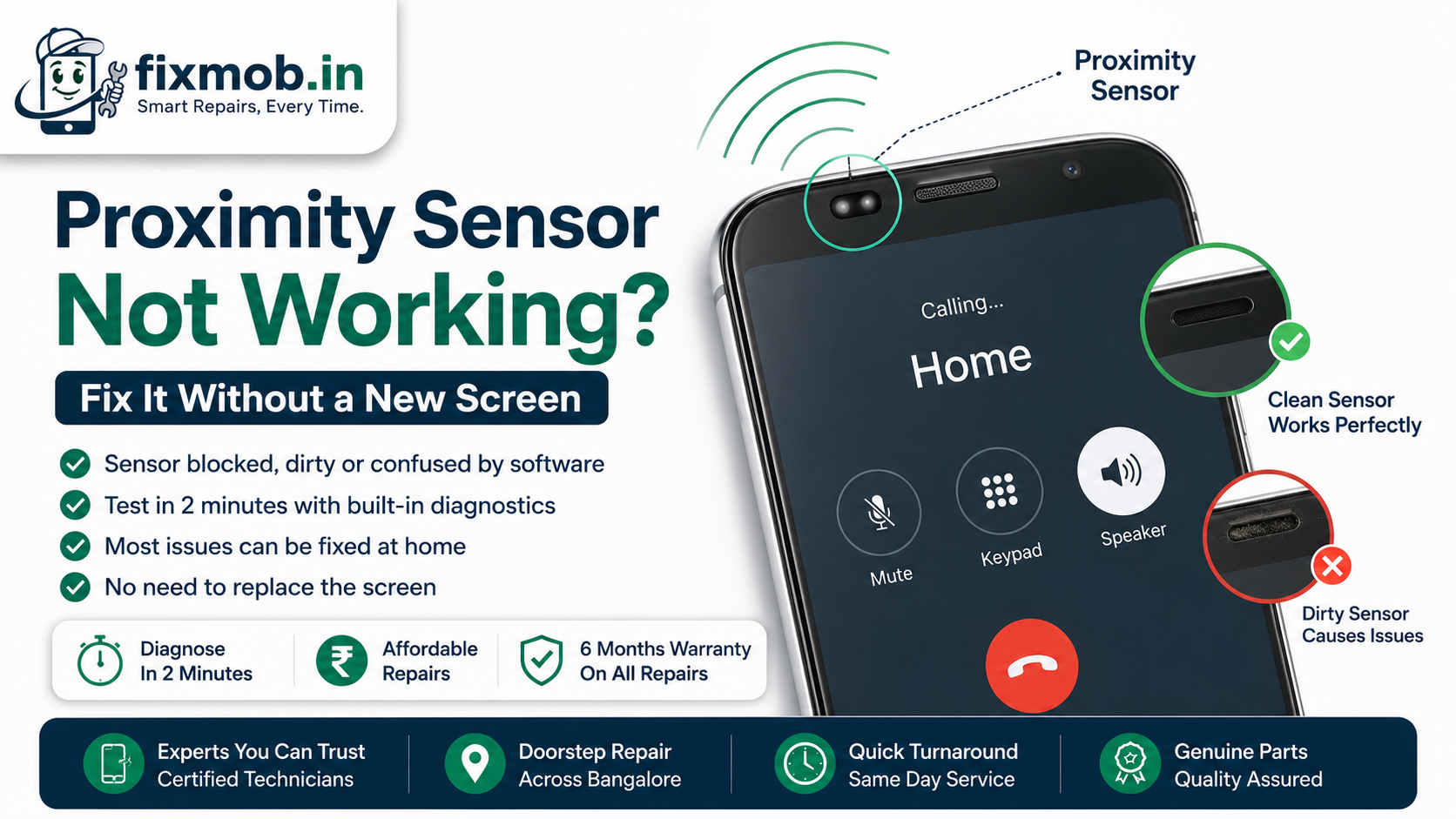
• The sensor sits behind the glass near the earpiece and reads reflected infrared light
• A thick screen guard over the sensor window causes more failures than hardware does
• Test it in two minutes with your phone’s built in diagnostics
• Faults that start right after a screen replacement usually point at the new display
What Does The Proximity Sensor Actually Do?
It measures how close an object is to the front of the phone and switches the display off when you lift the handset to your ear. Android’s own documentation notes that most proximity sensors report distance in centimetres, while some only report near or far.
The part itself is tiny. An infrared emitter fires a beam through a small window in the glass, and a receiver next to it measures what bounces back. Your cheek reflects a lot, so the phone reads near and blanks the screen.
That is the whole trick, and it explains every symptom on this list. Anything that blocks, dirties, or reflects into that window produces a proximity sensor not working the way it should.
• Screen goes black on a call and never comes back
• Your ear triggers mute, speaker, or hangs up the call
• The display wakes inside your pocket and drains the battery
• Face unlock behaves oddly in the dark
Why Is Your Proximity Sensor Not Working All Of A Sudden?
Something in front of the window changed. In most cases it is a new tempered glass guard, a smear of skin oil, or a case with a lip that sits over the earpiece cutout. Software updates are the second cause, and hardware failure is a distant third.
Cheap screen protectors are the usual offender in Bangalore. Many are cut without the correct opening for the sensor window, and the frosted band across the top is enough to scatter the infrared beam.
Grease matters more than dust. A fingerprint over the window acts like a permanent reflection, so the phone reads near all the time and the screen stays black during calls even when the handset is on the table.
Software causes are easy to spot by their timing. If a proximity sensor not working appeared the morning after an update installed overnight, restart the phone before you touch the hardware at all.
Genuine component failure is rare and usually has a trigger behind it: a drop on the top edge, a spill, or an earlier repair. A sensor that has worked for two years does not simply give out on a quiet Tuesday.
|
Symptom |
Most likely cause |
First thing to try |
|
Black screen never returns after a call |
Sensor reads near constantly |
Clean the glass above the earpiece |
|
Screen wakes in your pocket |
Sensor reads far constantly |
Check for a cracked or lifted guard |
|
Started after a new screen guard |
Guard covering the window |
Peel it off and retest |
|
Started after a repair |
Loose or wrong sensor flex |
Return to the technician |
|
Started after a software update |
Driver or calibration bug |
Restart, then test in safe mode |
Is It The Screen Guard, The Case, Or The Sensor?
Strip the phone bare and retest. Take off the case, peel the screen protector, wipe the glass above the earpiece with a dry microfibre cloth, then make a call. If it behaves, you have your answer without spending anything.
The narrow slot above your screen collects the same lint that clogs an earpiece grille. Our guide to telling dust from real speaker damage covers how that debris builds up in the same strip of the phone.
Watch out for one detail on recent handsets. Several 2023 and later phones moved the sensor under the display panel itself, which means there is no visible window to clean and a display fault and a sensor fault look identical from outside.
Cases cause a quieter version of the same trouble. A flip cover with a magnetic flap, or a thick rim that overhangs the earpiece slot, keeps the sensor half covered whenever the phone is against your face.
Test one variable at a time. Strip everything off, confirm the phone works bare, then add the case and the guard back separately so you know which one to replace.
How Do You Test A Proximity Sensor In Two Minutes?
Use the phone’s own diagnostics rather than guessing from call behaviour. Most brands expose a sensor test that shows a live near or far reading, which tells you in seconds whether a proximity sensor not working is hardware or habit.
1. On Samsung, dial the diagnostics code from the keypad and open the sensor test.
2. On Xiaomi, Realme, and Oppo, look for a hardware or engineer test menu in Settings.
3. On Pixel and stock Android, install a reputable sensor reader app from the Play Store.
4. On an iPhone, there is no user test, so use call behaviour and Face ID instead.
5. Cover the area above the earpiece with your palm and watch the reading flip to near.
6. Take your hand away and confirm it flips back to far within a second.
A reading that never changes points at hardware or a blockage. A reading that changes correctly while calls still misbehave points at the dialler app, so clear its cache and retest.
Restart the phone in safe mode as your last software check. If the sensor behaves in safe mode, an installed app is interfering, and the culprit is usually something installed the same week the trouble started.
Calling apps deserve their own check. WhatsApp, Telegram, and Truecaller each manage the screen during calls, so test the native dialler too before you blame the hardware. A proximity sensor not working in one app only is a software fault, every time.
Did It Break Right After A Screen Replacement?
That timing is not a coincidence. On many phones the proximity sensor sits on a flex cable behind the display, and a replacement panel of the wrong grade can ship without the correct sensor mesh or with the window misaligned by a millimetre.
Three things go wrong during a display swap. The sensor flex is not seated fully, the foam gasket that blocks stray light is left off, or the panel itself is a low grade copy.
None of these mean your phone is ruined. Go back to whoever did the work and ask them to reseat the flex and check the gasket, because a proximity sensor not working after a repair is normally a fitting error rather than a dead component.
This is one of the reasons part grade matters so much on display work, a point our cracked screen repair guide makes in detail. Ask what panel is going in before the job starts, not after.
What Does Proximity Sensor Repair Cost In Bangalore?
Cleaning costs nothing. A sensor flex replacement typically runs 800 to 3,000 rupees on mainstream Android handsets, while iPhone front sensor assemblies and under display sensors sit higher because the part arrives as a sealed module.
|
Fix |
Typical Bangalore range |
Time needed |
|
Clean and reseat, no parts |
Free to 300 rupees |
15 minutes |
|
Sensor flex replacement, Android |
800 to 3,000 rupees |
45 minutes |
|
Front sensor assembly, iPhone |
2,000 to 6,500 rupees |
Workshop job |
|
Display replacement, under screen sensor |
Screen replacement price |
30 to 60 minutes |
Two things move the number. Whether the sensor is a separate flex or bonded into a larger assembly, and whether liquid has reached the board underneath.
The last row of that table is the one worth questioning. On a phone with an under display sensor there is no cheaper path, but on everything else a full screen quote for a sensor complaint deserves a second opinion.
Insist on a diagnosis before you agree to anything, and be wary of a shop that quotes a full display replacement for a sensor complaint without testing first. Our repair services page lists what a proper inspection covers.
Frequently Asked Questions
Can I recalibrate the proximity sensor myself?
Some Android brands include a calibration option in their hardware test menu. Most modern phones and every iPhone do not, so cleaning and reseating are the practical fixes.
Does a tempered glass guard always cause a proximity sensor problem?
No, only a badly cut one. A guard with the correct cutout over the sensor window works fine, which is why the fault often appears the day a new guard goes on.
Why does my screen stay black after the call ends?
The sensor is stuck reading near. Clean the glass above the earpiece first, then check for a guard, a case lip, or a case with a magnetic flap covering the top strip.
Can water damage the proximity sensor?
Yes. Moisture leaves residue on the sensor window and can corrode the flex connector, which often shows up as a proximity sensor not working weeks after the spill.
Is a factory reset worth trying?
Only after safe mode and a cache clear. A reset fixes genuine software corruption, but it costs you a full setup and does nothing for a blocked or damaged sensor.
Will the phone still work if I ignore it?
It works, but expect accidental mutes and pocket dials. The bigger cost is battery, because a screen that keeps waking in your pocket drains a charge quickly.
What Is The Fastest Way To Start?
Spend five minutes on the free checks first. Case off, guard off, glass cleaned, one restart, then a sensor test from the keypad. That sequence clears the majority of cases without a technician.
If the reading still refuses to move, book a doorstep repair and have it diagnosed in front of you. A proximity sensor not working is usually a same day fix, and you should have the quote before anything is opened.